Overview
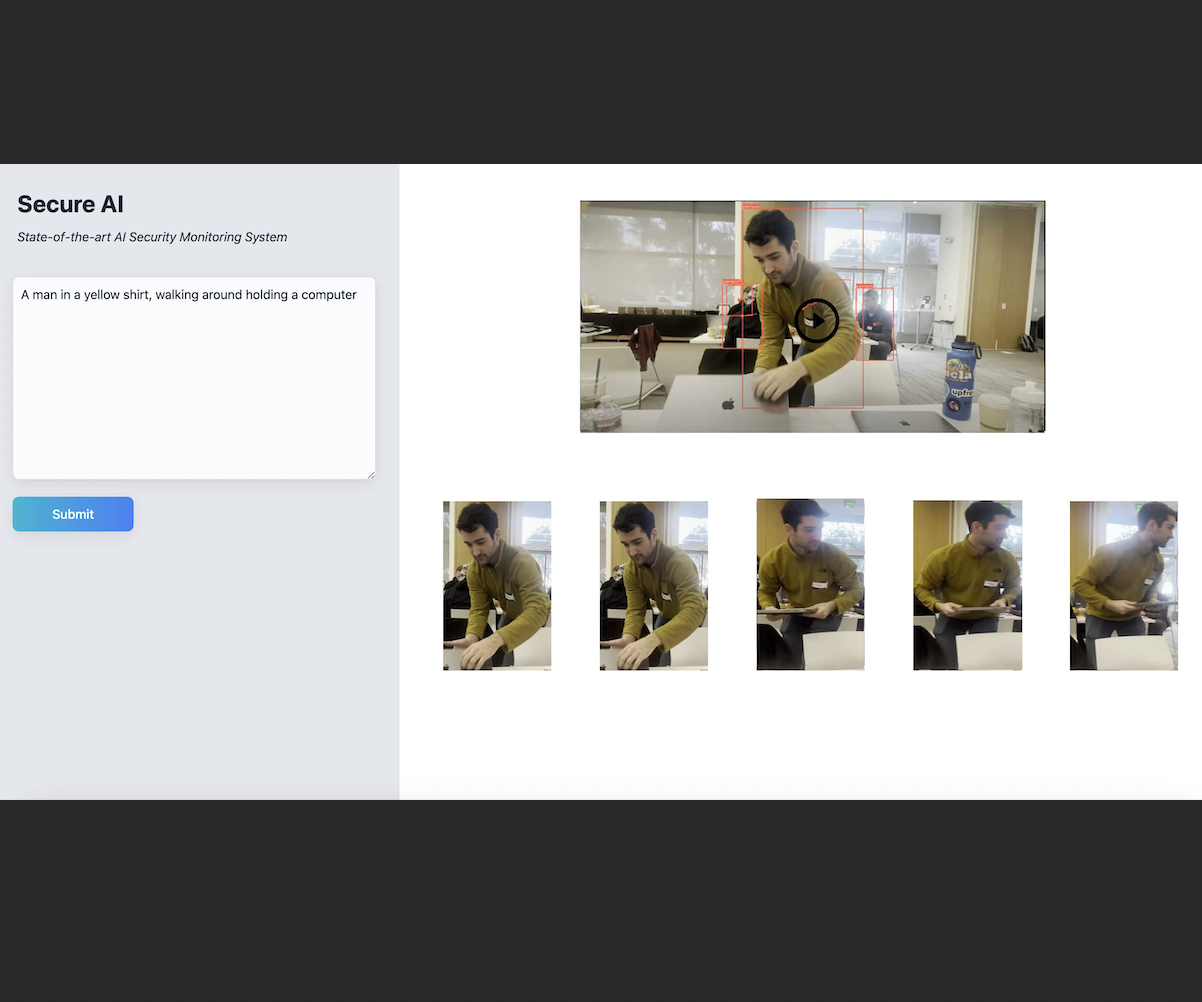
Secure AI lets you search security footage the way you'd describe it to a person: "guy in the yellow sweater," "someone on their phone," "person at the laptop." Instead of scrubbing through hours of video, you type a query and get back the matching frames, a written summary of what happened, and a playback of the clip with the person of interest boxed.
We built it at LlamaIndex's 2024 Bay Area GenAI Hackathon, and it won out of more than 400 participants.
Under the hood, Secure AI combines classic computer vision with multimodal retrieval-augmented generation (RAG). A YOLOv8 tracker finds and follows every person in the video. Gemini Pro Vision writes a description of each crop. CLIP embeddings stored in an AstraDB vector database let a plain-English query retrieve the right people, and Gemini then summarizes what the retrieved frames show.
Background
Most security footage is never watched. When something happens, someone has to find the right camera and timestamp and then manually scan for a person who matches a vague description. Existing search tools are mostly built on fixed object classes ("person," "car") or timestamps. They can tell you that a person appeared, but not which person.
Two recent developments make a better approach possible:
- Joint image–text embeddings like CLIP map images and text into the same vector space, so the text "yellow sweater" lands near pictures of yellow sweaters, with no training on your specific footage.
- Retrieval-augmented generation grounds an LLM's answer in documents retrieved for each query. Here, the "documents" are video frames. The model only summarizes what retrieval actually found, instead of guessing what's in the video.
The goal was to put these together into something an investigator could actually use.
Architecture
The system has three parts:
- Offline ingestion pipeline (Python): detects, tracks, crops, describes, and embeds every person in a video, then loads the results into a vector store.
- Flask API: takes a natural-language query, runs multimodal retrieval against AstraDB, generates a summary with Gemini, and returns the matching crops along with an annotated video.
- React frontend (Vite + Tailwind): a search box, a grid of result cards, a summary card, and a video player.
The pipeline from video to answer:
- Video → YOLOv8 tracking: every person gets a persistent track ID, and their bounding box is recorded for every frame.
- Tracks → crops: every 10th frame, each tracked person is cropped out and saved as
frame_track_class.jpg. - Crops → Gemini Pro Vision: each crop gets a structured description (who's in it and how many people), parsed into a Pydantic schema.
- Crops + metadata → CLIP embeddings → AstraDB: crops are indexed with LlamaIndex's
MultiModalVectorStoreIndex, with frame, track ID, source video, and Gemini description attached as metadata. - Query → top-6 image retrieval → Gemini Pro summary: the API's response is generated from the retrieved descriptions only.
Implementation
Detection and tracking. The ObjectDetector wraps Ultralytics YOLOv8 in tracking mode (model.track(frame, persist=True)), so each person keeps the same ID across frames. For every frame, it logs each track's bounding box to frames.json. Sampling crops every 10th frame instead of every frame cut the number of images to describe and embed tenfold.
Describing crops. Each crop goes through Gemini Pro Vision with LlamaIndex's MultiModalLLMCompletionProgram and a PydanticOutputParser, which forces the model to return a fixed {summary, number} structure instead of free-form text. If a crop is unreadable, it gets an explicit "We cannot identify this picture" summary instead of whatever the model might make up.
Indexing. Crops are loaded with a metadata function that parses the frame, track, and class from the filename and attaches the Gemini description. The resulting ImageNodes are embedded with CLIP (512-dimensional) and stored in DataStax AstraDB.
Retrieval and summarization. At query time, the Flask /main endpoint embeds the query text into CLIP space, pulls the six nearest image nodes, and builds a prompt from only their stored descriptions:
def retrieve_nodes(query, astra_db_store):
  index = MultiModalVectorStoreIndex(
      nodes=[], image_vector_store=astra_db_store, is_text_vector_store_empty=True
  )
  retriever_engine = index.as_retriever(image_similarity_top_k=6)
  return retriever_engine.retrieve(query)

def get_summary(nodes):
  prompt = ("summarize the following event description for each video frame "
            "in one sentence. Also give a description of the person's appearance:\n")
  for node in nodes:
      prompt += node.node.metadata["gemini_summary"] + "\n"
  return model.generate_content(prompt).text
Because the summarizer only sees descriptions of retrieved frames, everything it says is tied to footage that actually exists. That's the main defense against hallucination: Gemini summarizes evidence instead of answering from scratch.
Video annotation. The /video endpoint uses the stored track data to redraw bounding boxes on the original footage with OpenCV and re-encodes it as H.264 so browsers can play it. Users can then watch the matched person move through the scene.
Results
We indexed demo footage and searched it by clothing, activity, and objects:
- "yellow sweater guy"
- "person on their phone"
- "someone sitting at a laptop"
Each query returns the closest-matching crops along with a summary of what that person was doing across the retrieved frames. Because each result carries its frame number and track ID, every hit links straight back to a timestamp in the source video.
The structured-description step turned out to be important. Grounding the final summary in per-crop descriptions, instead of asking a model to describe the whole video at once, is what keeps the summary from inventing people or events that aren't in the footage.
Conclusion
Secure AI showed me that the most useful AI systems are usually pipelines, not a single model. YOLO handles where people are, CLIP handles what matches the query, and Gemini handles explaining it. Each does the part it's good at, and RAG keeps the language model honest.
Limitations and next steps:
- Live ingestion: the pipeline currently runs offline on pre-recorded video. Making it incremental would allow live camera feeds.
- Metadata filters: combine similarity search with structured filters like time range, camera, or number of people. The index metadata already supports this.
- Re-identification across cameras: link the same person's tracks across different videos.
- Privacy controls: add access logging, retention limits, and redaction, which any real surveillance tool needs.