Overview
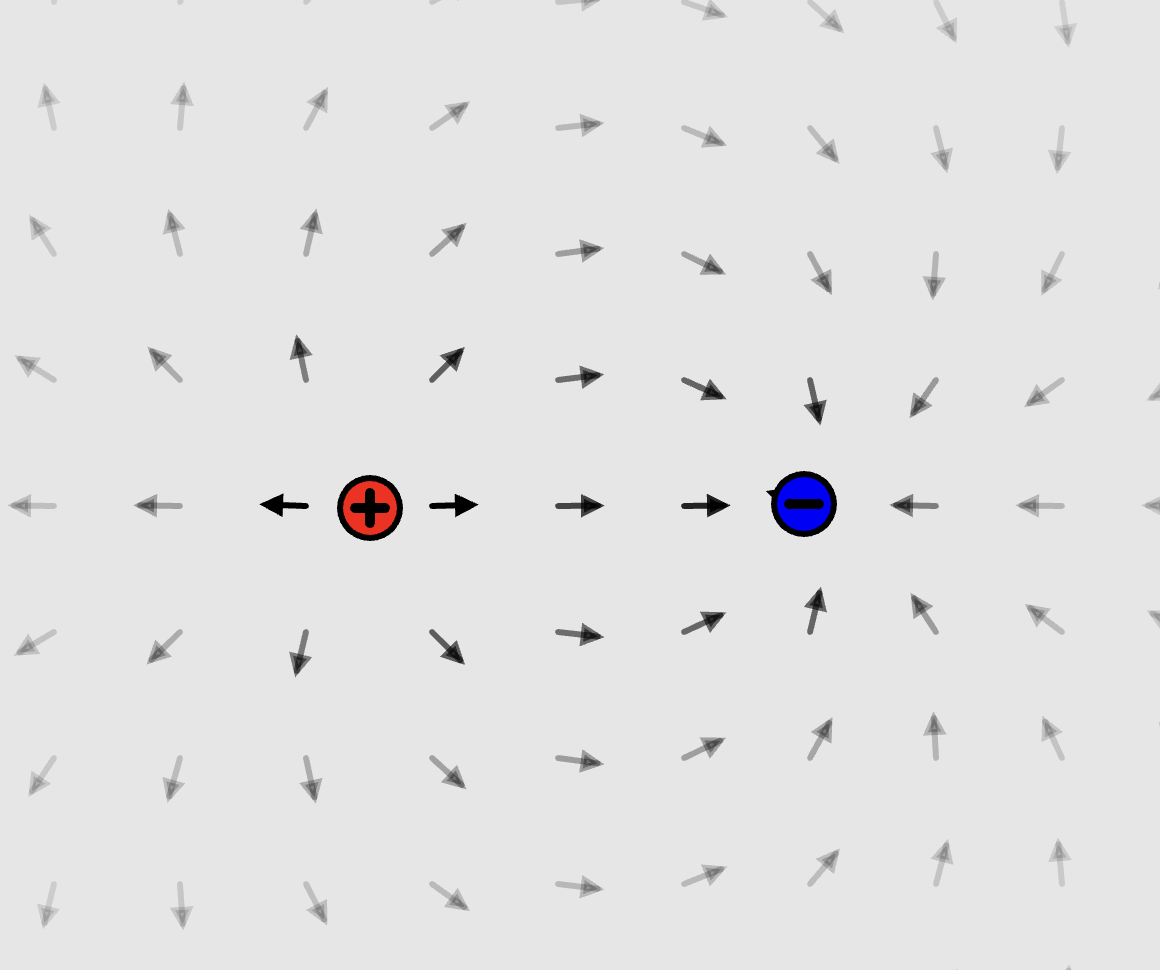
Electro is an interactive 2D electrostatics sandbox that runs in the browser. You drop positive and negative charges onto a canvas, and a field of arrows updates live to show the net force at every point. Press animate and the charges start moving under each other's forces: like charges push apart, and opposite charges pull together and stick when they touch.
I built it to make Coulomb's law something you can see and play with instead of just reading about. A textbook can tell you that fields superpose, but dragging a proton around a cluster of electrons and watching the arrows swing makes it intuitive.
The whole thing is plain JavaScript on top of p5.js, with no build step. It's live at kyco12.github.io/electrostatics.
Background
The force between two point charges is given by Coulomb's law:
F = k · q₁q₂ / r²
It acts along the line between the two charges. It's attractive when the charges have opposite signs and repulsive when they match. Forces are linear, so with many charges the net force on any one of them (or on a test charge at any point in space) is just the vector sum of the pairwise forces. That's the superposition principle, and it's the only physics the simulator needs.
The electric field is what you get when you evaluate that superposition with a unit test charge at every point. Electro draws it as a grid of arrows: each arrow points in the direction a positive test charge would be pushed, and gets darker as the force gets stronger.
Design
The code is split into a few small p5.js modules:
Particlestores a charge's sign, position, velocity, mass, and radius. It computes its own net force and updates its own motion.Fieldis a grid ofArrows spaced evenly over the canvas. Every frame, each arrow recomputes the superposed force at its location.GUIholds the controls along the top: add a proton (+) or electron (—), remove the last particle, clear the canvas, toggle animation, a slider for field density, and a text box for setting a selected particle's velocity.sketch.jsis p5'ssetup/drawloop plus the mouse handlers for selecting and dragging particles.
Particles can be clicked to select them, which opens a readout of their position, velocity, force, and acceleration, and dragged to reposition them, even while the simulation is running.
Implementation
Each particle sums its pairwise Coulomb forces with every other particle. The force direction is the vector from the other particle to this one. Its magnitude is set by Coulomb's law, and the sign of the charge product decides whether it attracts or repels:
this.getForceTo = function(p){
  let k = 300 // scaled so motion stays visible at 60 fps
  let r = dist(p.pos.x, p.pos.y, this.pos.x, this.pos.y)
  if (r > 0){
      let force = this.pos.copy().sub(p.pos.copy())
      force.setMag(k * this.charge * p.charge / (r * r))
      return force.copy()
  }
  return createVector(0, 0)
}

this.superposition = function(particles){
  let forceSum = createVector(0, 0)
  for (let i = 0; i < particles.length; i++){
      forceSum.add(this.getForceTo(particles[i]))
  }
  return forceSum.copy()
}
Every frame, each particle integrates its motion with a simple explicit Euler step: v += F / m, then p += v. The real Coulomb constant would send particles off-screen in a single frame at pixel scale, so the motion uses a scaled-down constant that keeps things visible. The on-screen readout for a selected particle reports force and acceleration using physical constants (k = 8.99 × 10⁹ N·m²/C², e = 1.602 × 10⁻¹⁹ C).
For collisions, when two oppositely charged particles overlap, their velocities are set to zero so they stick together instead of passing through each other and blowing up as r → 0.
The field is rebuilt every frame on a grid whose spacing comes from the density slider (30–100 px). Each arrow's direction is the superposed force at its base, and its opacity scales with the magnitude, so strong-field regions near charges stand out and empty space fades away.
Results
Electro shows the classic textbook configurations with no extra setup:
- Dipoles: a proton next to an electron produces the familiar field lines that curve from + to −.
- Like charges: two protons push each other apart, and the field between them has a dead zone at the midpoint.
- Many-body systems: with several charges, you can watch electrons fall onto protons, stick, and form neutral clusters whose fields mostly cancel out.
Since everything is O(n²) pairwise math in JavaScript, it stays smooth with a handful of particles and a moderate field density. At the finest grid setting, the field update becomes the main cost per frame.
Conclusion
Electro was one of my first real projects, and it taught me how much you can build from a small amount of physics plus a clean update loop. The physics fits in about ten lines. Most of the work was in making it feel good to use: picking the scaled constant, making collisions stable, and making the field readable at a glance.
Next, I'd like to:
- Switch to a more stable integrator, like velocity Verlet, so energy doesn't drift
- Draw continuous field lines and equipotential contours instead of only a grid of arrows
- Add elastic collisions and walls, so particles don't drift off-screen
- Make charge and mass adjustable per particle